A queue, not a diary
Register a walk-in at the desk and they get today’s next token. The doctor works the list; a completed visit closes the token. Numbers restart each morning, per clinic.
Ygeia opens to clinics on — write to us to be set up on the first day.
For clinics that see patients as they arrive
Ygeia is built around the walk-in queue: a token when someone arrives, the doctor’s list in order, a GST invoice at the end. Appointments are there when you need them — they just aren’t the whole day.
Opening to clinics on . From ₹499 a month per clinic. Every plan is free for the first 3 months.
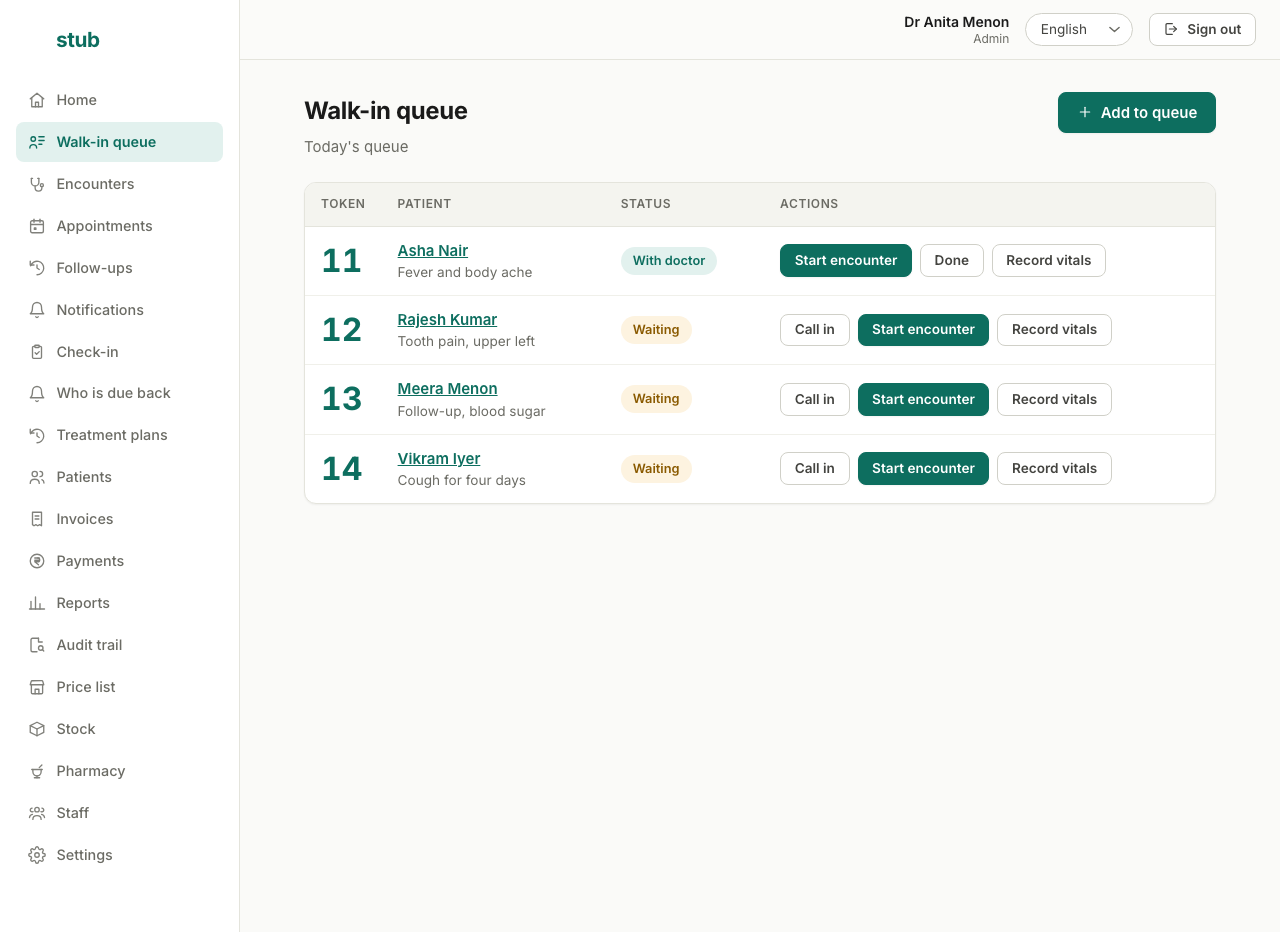
A token when they arrive, the reason they came, and one button to start the consultation. Numbers restart each morning.
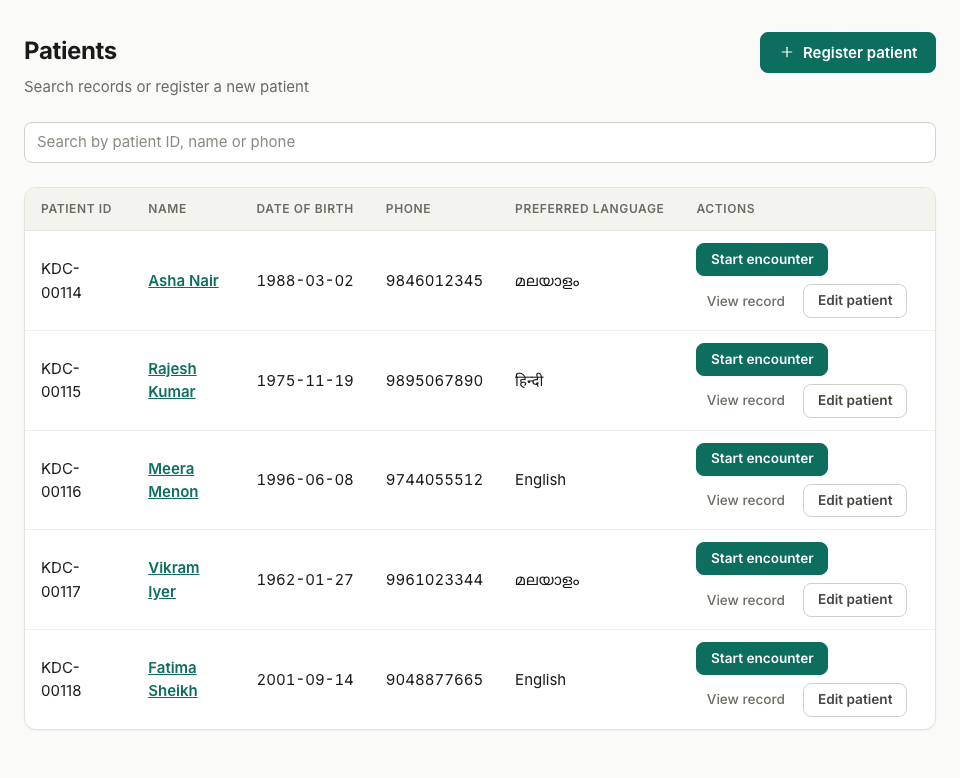
Search by name, phone or patient number. Each patient carries their own number, printed on the card they keep.
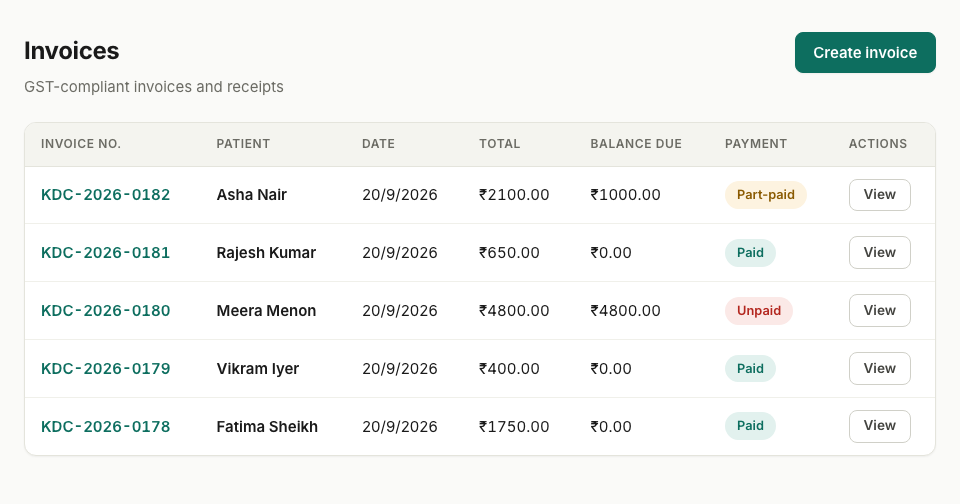
Numbered in your own series, with the balance worked out from the payments rather than typed twice.
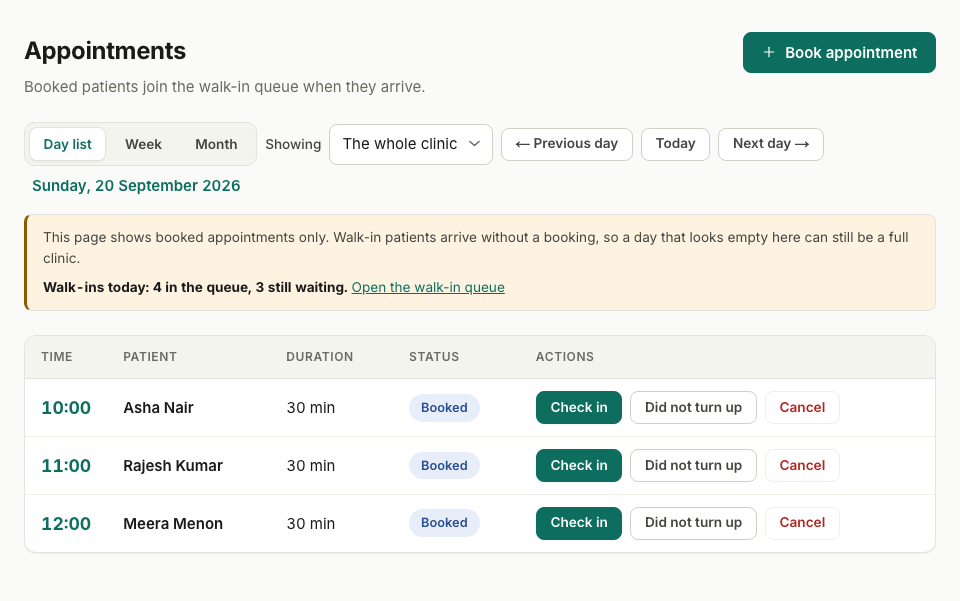
Honest about what it is not showing: four walk-ins were waiting while this day looked quiet.
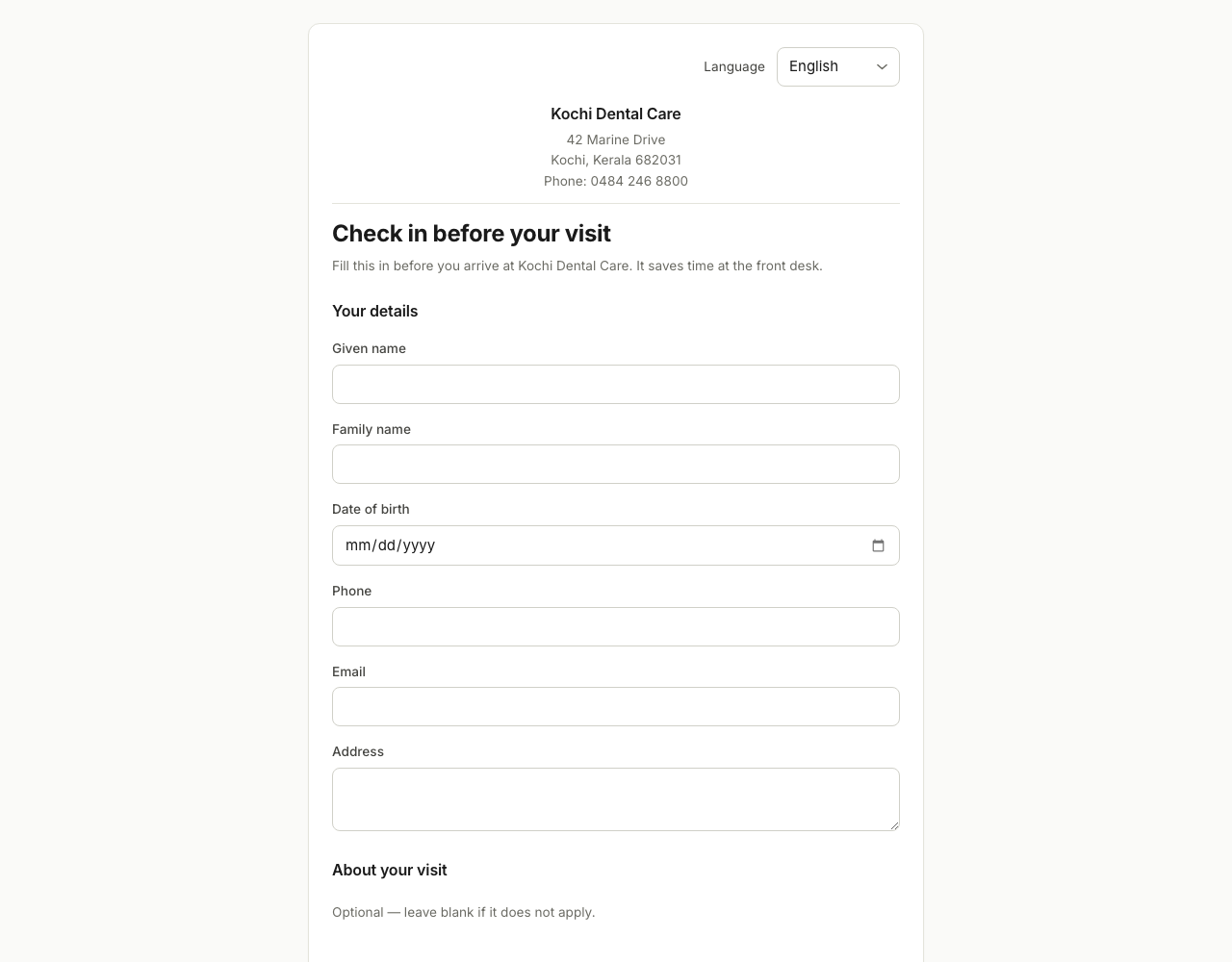
What your patients see. Your clinic's name on it, never ours — and nothing reaches a chart until somebody at the desk accepts it.
What that means concretely
The walk-in, end to end
No appointment needed, and nothing waiting on one.

Registered at the desk, or already checked in from their phone.
Today's next number. The queue is in order of arrival.
Notes typed or dictated. The token closes when the visit ends.
A GST invoice on your letterhead. UPI, cash or card.
What you get
Register a walk-in at the desk and they get today’s next token. The doctor works the list; a completed visit closes the token. Numbers restart each morning, per clinic.
GST invoices on your own letterhead and logo, numbered in your own series. Record UPI, cash or card against them — including part payments — and the outstanding list and the day’s takings add themselves up.
Dictate in the browser and edit the draft, or type it. Notes stay editable after the visit, and every change keeps what it said before.
Lab reports and scans filed against the patient. Prescriptions that warn you about that patient’s own recorded allergies. Vitals, referral letters, and the visit history behind them.
Not a translated menu bar — the whole application, including what gets printed. Your front desk and your doctors can each work in the language they prefer.
A link or a QR code by the desk. They fill in their details, and optionally pick a time. Nothing reaches a chart until somebody at the clinic accepts it.

On the Premium plan
The ambient scribe records the visit, turns it into a draft note in SOAP form, and shows it to you beside the transcript. You edit it and you sign it.
Nothing unsigned ever reaches the chart. A draft the clinician has not signed is not part of the record, is not on the printed file, and is marked as excluded if anyone prints one. The note carries your name and registration number because you put it there.
The recording needs the patient’s consent, taken on the screen in the language they speak, and a session cannot start without it. Recordings are deleted on a schedule your clinic sets; the note and the transcript stay.
From Standard
An Android app for the people seeing patients: today’s waiting list, their own schedule and the patient’s record. On Premium it records the consultation too, without carrying a laptop between rooms.
Notifications carry no patient details — the phone is told there is something to read, and the app fetches it once you unlock it.
What the month earned
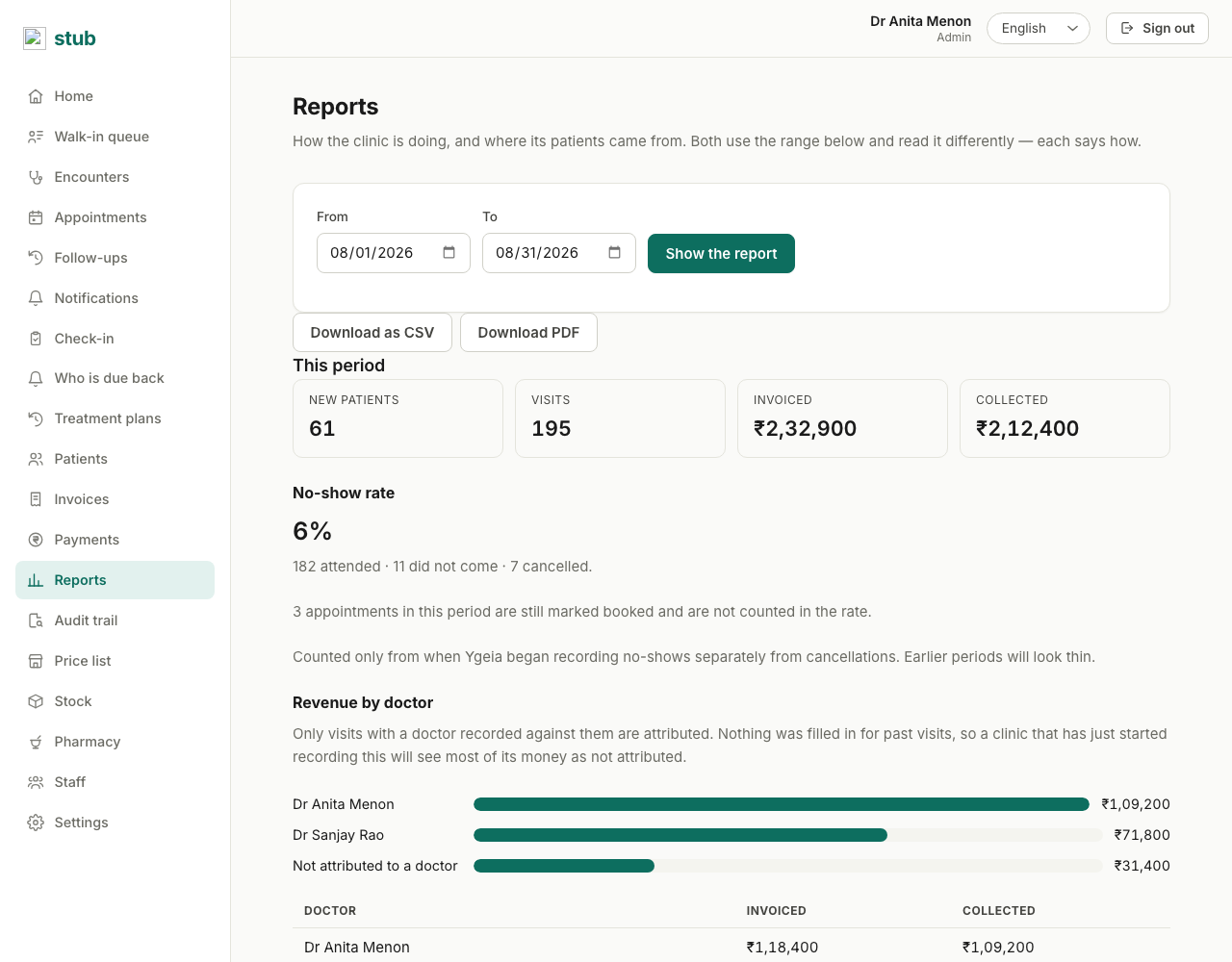
Revenue by day, the procedures you bill most, and what each doctor brought in — drawn rather than tabulated, and downloadable as a PDF or a CSV when your accountant asks.
The unattributed remainder is shown as its own bar. Most visits at a walk-in clinic are never attributed to a named doctor, and a report that quietly dropped them would under-report every clinician by an amount nobody could see. The columns add up to the period’s own total, which is the checkable part.
Reports are on the Standard plan and up, and only an admin can open them — salaries and takings are not front-desk reading.
The waiting room
Walk-ins get a number at the desk. The consulting room works down the same list, so nobody has to ask the receptionist who is next — and the receptionist is registering the next patient rather than answering that question all day.
Appointments join the same queue. Checking one in issues a token like any other arrival, so a booked patient and a walk-in are one list rather than two that disagree.
A screen in the waiting room can show the same queue with the numbers alone — no names, no reasons.
Specialities
You pick your speciality when you sign up, from 38 of them. It is recorded on the clinic and on every visit, so your notes and your reports are about the work you actually do.
Not on the list? The taxonomy is what we already model, and a clinic that does not fit it still gets the whole front desk — the type changes what your notes are about, not what the software does.
The things below are not settings you have to find. They are how the product works.
Records, recordings and invoices are stored in Mumbai. Where a speech-to-text or note-generation step runs outside India, the app names that step and its region on a settings page — so you can write your own patient consent accurately instead of guessing.
Enforced on the server, not hidden in the interface. Another clinic’s record does not come back refused; it does not come back at all.
Reads of a patient record are recorded, and so is every document handed out of the clinic. The log holds the patient’s id and never their name — otherwise it would be a second copy of the chart with weaker access rules.
Your front desk can register patients, take payments and file a lab report. They cannot sign a clinical note. A note carries the name and registration number of the clinician who signed it.
The scribe cannot open, and cannot take a byte of audio, without a consent recorded for that visit — read to the patient in the language they speak. Recordings expire on a schedule you set; the note and the transcript stay.
Correcting a note is normal and the previous words are kept, because “the note said something different yesterday” is asked precisely when somebody is disputing what was recorded.
Before you ask
That is who it is built for. Start on the free plan with one doctor: register walk-ins at the desk, hand out tokens, raise an invoice. You do not have to use appointments, the scribe, or reports to get value on the first morning.
Import them from a CSV. It runs as a dry run first and tells you exactly what it would create, what already matches somebody on file, and which rows it refuses — an unreadable date of birth is refused rather than guessed, because a wrong one splits a patient’s record in two.
You can keep reading. If the line goes while Ygeia is open, the queue, your patient list and the charts you had loaded stay on screen, and a notice tells you how old they are — so you are never guessing whether what you are looking at is current. Nothing new can be saved until the connection returns, and it is not held back to send later: a token, an invoice number or a receipt created on two desks at once would clash, and an invoice you have already handed a patient must not change afterwards. Reloading the page during an outage will not work either. So a genuinely unreliable connection is still a real consideration — but a line that drops for ten minutes mid-clinic no longer stops you seeing who is waiting or reading a chart.
We do not publish a number, because we have not measured one we would stand behind. What we can tell you is how it is built to fail safely: the draft note is shown beside the transcript, nothing reaches the chart until a clinician signs it, and the original recording can be read again for a better transcript. Try it on your own consultations during the free months and judge it on your own accents.
Only people in your clinic — a clinic can never read another clinic’s patients, and that is enforced on the server rather than hidden in the interface. Reads of a chart are recorded, so “who opened this record” is answerable. Access follows the role: only a doctor or a nurse can open or write a clinical note, your front desk runs the register, the queue and the money without seeing the chart, and a pharmacist sees the prescription in front of them and the patient’s allergies — not the record.
Yes. A patient’s whole file prints as a PDF — visits, notes, invoices and payments — and so does a single visit. It is your clinic’s record, not ours, and nothing you have recorded is deleted or hidden if you move to a lower plan.
Pricing
One price per clinic, per month. Not per patient, not per invoice, and no charge for your receptionist having an account.
Compare the plansOne doctor, the full front desk, free for the first 3 months and no card to start. Move up when you need a second clinician or the scribe.